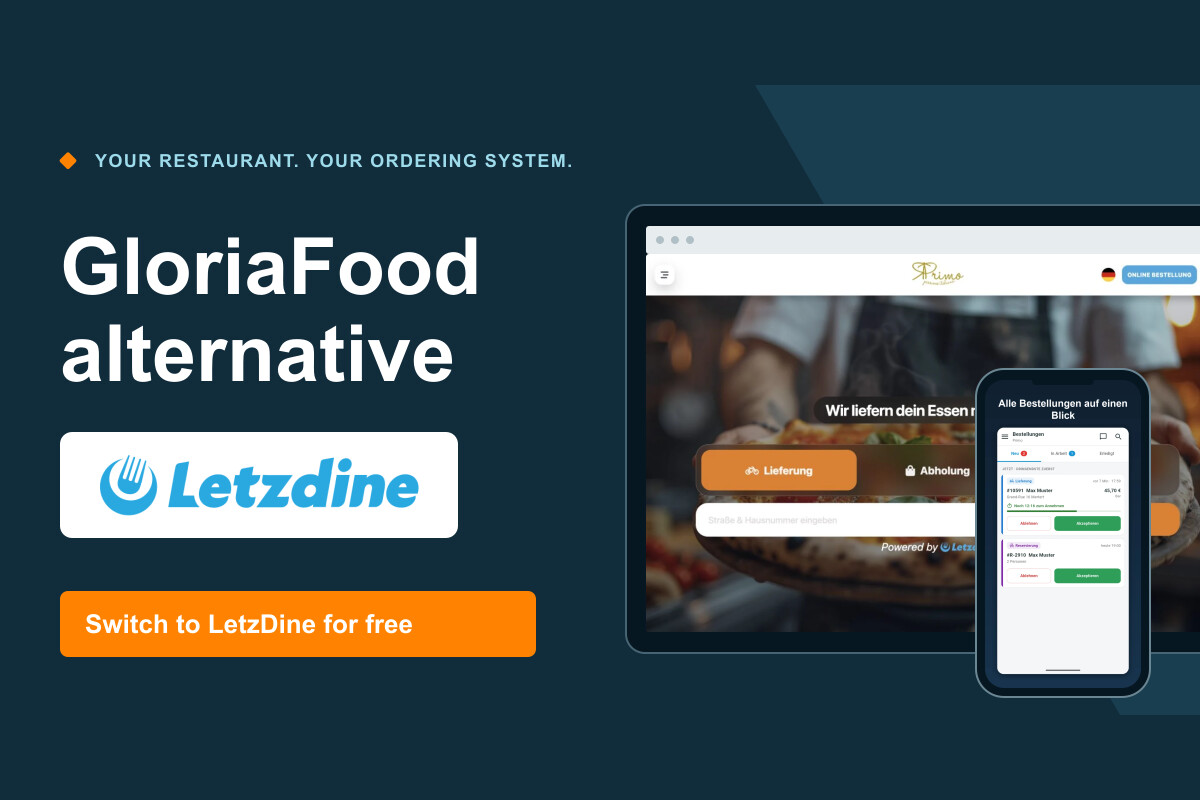
GloriaFood shuts down on 30 April 2027. In this article we introduce LetzDine – the online ordering system for restaurants: your own restaurant website, the LetzDine platform, the restaurant app and receipt printers. We also explain how we handle your switch free of charge, including entering all your data.
GloriaFood is shutting down: what it means for your restaurant
According to the official GloriaFood website, GloriaFood reaches the end of its life on 30 April 2027. If you currently take delivery or pickup orders through GloriaFood, you will need a new system by then – and not just any system that somehow accepts orders, but one that fits the way your kitchen, service and delivery actually work.
The deadline may sound far away, but switching involves more than a new login. Your menu with all its sizes and extras has to be set up again, delivery areas and hours need testing, and in the end your order button, Google profile and QR codes all have to be updated. If you plan early, you can test calmly instead of moving under pressure just before the deadline.
LetzDine is provided by VIRTUMA UG. We introduce the system and explain how we support you personally with the switch. LetzDine is a standalone alternative to GloriaFood. Below you will find out how the system is structured, what it does in everyday restaurant life and how we transfer your content.
What to look for in a GloriaFood alternative
In daily use, you only really notice an ordering system when something doesn't fit. So before deciding, check what your business actually needs.
Order types and menu
Check whether the system covers everything you offer: delivery, pickup and, if relevant, table reservations. The menu matters just as much. If your pizza comes in two sizes with their own topping surcharges, the system has to handle that cleanly.
Delivery areas, hours and order handling
Can you define delivery zones and set your own ordering hours? And how do orders reach you: through an app on a tablet or smartphone, through a receipt printer, or both? On busy evenings, order handling decides whether a system takes pressure off or adds to it.
Costs and support
Do the maths with your real order numbers, not an ideal month, and look out for per-order commissions and online payment fees. Also ask who will help you set things up and who you can reach if something stops working later. During a switch, a personal contact is often worth more than a long feature list.
How LetzDine is structured: website, platform and restaurant app

LetzDine consists of three parts with different jobs: your guests meet you in two places, and you work with a third tool.
1. Your own restaurant website
You get a restaurant website that belongs to your business: with your logo, your colours, your photos and your texts. Your guests order directly from you there – for delivery or pickup – or reserve a table. This standard website is included in the offer and costs you nothing extra. The two examples further down show how different two restaurants can look using the same system. If you would also like a fully custom-built website, that is available on request; we then discuss the scope and cost with you separately.
2. The LetzDine platform
Separately from your own website, your restaurant can also be found on LetzDine.eu. Guests search there by cuisine and location, come across restaurants near them and order directly. Your restaurant appears in the uniform LetzDine design, with the same menu and the same prices as on your website. So the platform doesn't replace your website; it's an additional way for new guests to discover you.
3. The restaurant app for you and your team
Your guests don't see the third layer: in the restaurant app you accept orders and reservations, see what's currently in progress and maintain your menu. Changing prices, temporarily deactivating a dish or adding a new item – you do it yourself, without waiting for anyone. Whatever you change in the app applies to your website and the platform alike.
The key features in day-to-day use
Delivery, pickup and reservations
Your guests can order for delivery or pickup and reserve a table via the website. You decide which of these options you offer and can use them independently of each other.
Sizes, extras and toppings
Dishes can be set up in several sizes with their own prices, plus extras and toppings with a surcharge. An example from the demo further down: Pizza Margherita in Ø 32 cm for 13,90 €, with extra cheese and ham – the basket ends up at 18,40 €, and you can see exactly what was chosen in the order.
Delivery zones and hours
You decide where you deliver and when orders can be placed. For your delivery areas you can set different minimum order values and delivery fees. You set up your ordering hours to match how your restaurant runs.
Menu management and online payment
You maintain your menu yourself in the restaurant app, from price changes to new dishes. For online payment you connect Stripe; the payment provider's fees are charged separately and are not part of the LetzDine system fee.
Multiple languages and customer loyalty
The ordering area is available to guests in German, French and English. With offers and loyalty points you can also give guests a reason to order directly from your restaurant again.
Personal support
If you have questions or want something changed, you can reach us personally – especially in the first weeks after the move.
Connecting receipt printers: even several, for example for kitchen and bar
Many restaurants don't just work with a screen but with paper: in the kitchen, a ticket is quicker to grab than a tablet sitting between pans and oven. That's why you can connect a receipt printer to LetzDine – and several if you need them.
How to set it up
In the restaurant app you add a printer; the app searches for printers on your Wi-Fi network. You give each printer a name and decide what it prints. A typical setup with two devices looks like this: the “Kitchen” printer prints the kitchen ticket with the food and the customer receipt, but no drinks. The “Bar” printer prints only the drinks.
An everyday example
Picture a Friday evening: an order comes in – two pizzas, a salad, two colas. As soon as you accept it in the app, it is printed: the food appears on the kitchen ticket, the two colas on the ticket at the bar, and the customer receipt with all prices comes out together with the kitchen ticket. Nobody has to copy orders by hand or carry a slip from the kitchen to the bar, and each station only sees what it actually needs to prepare.
What to check in advance
Not every printer works with every system. So we work out together whether your existing devices are suitable or which printer fits your setup, before you buy anything. If additional hardware is needed, we discuss the cost with you beforehand. Either way, test printing under real conditions before you switch over – ideally with a test order at a time when your team is actually working.
LetzDine explained: website, ordering and platform
Your own restaurant website, choosing extras, the basket and the shared LetzDine platform: this short overview shows the real screens step by step.
The video is available in German and French (no English audio). Choose a language:
GermanVideo with German narration
Product video with German narration, real screens and animated explanations. German subtitles can be switched on in the player; the content is also available as text.
FrenchVideo with French narration
Discover your restaurant website, ordering with extras, the LetzDine platform and the management app.
French narration and on-screen text. French subtitles are available in the player.
Read the content of the French video
Your restaurant website with your logo, colours, photos and texts is included. Your guests choose dishes and extras and add them to the basket. The LetzDine platform lets guests discover restaurants; the management app lets you handle orders, reservations and the menu.
The switch is free: we enter your menu, photos and content for you. Up to and including 50 orders per month, the system is free. From the 51st order, a flat 25 € net applies for the month concerned, with no commission per order. Payment provider fees are added separately.
Video content summary
- Your free restaurant website with your own colours, logo, images and texts.
- A second design, using Restaurant Chinois as an example.
- Choosing a dish with size and extras and adding it to the basket.
- Searching for restaurants on the LetzDine platform and opening them in the LetzDine design.
- Managing orders and the menu in the restaurant app.
- Free switch including data entry. Up to and including 50 orders per month: 0 €; above that, a flat 25 € net for the month concerned, with no order commission. Payment provider fees are separate.
What LetzDine looks like in practice
Your own website, the shared platform for guests and your internal management: here are the three areas using a concrete example.
Your restaurant. Your design.
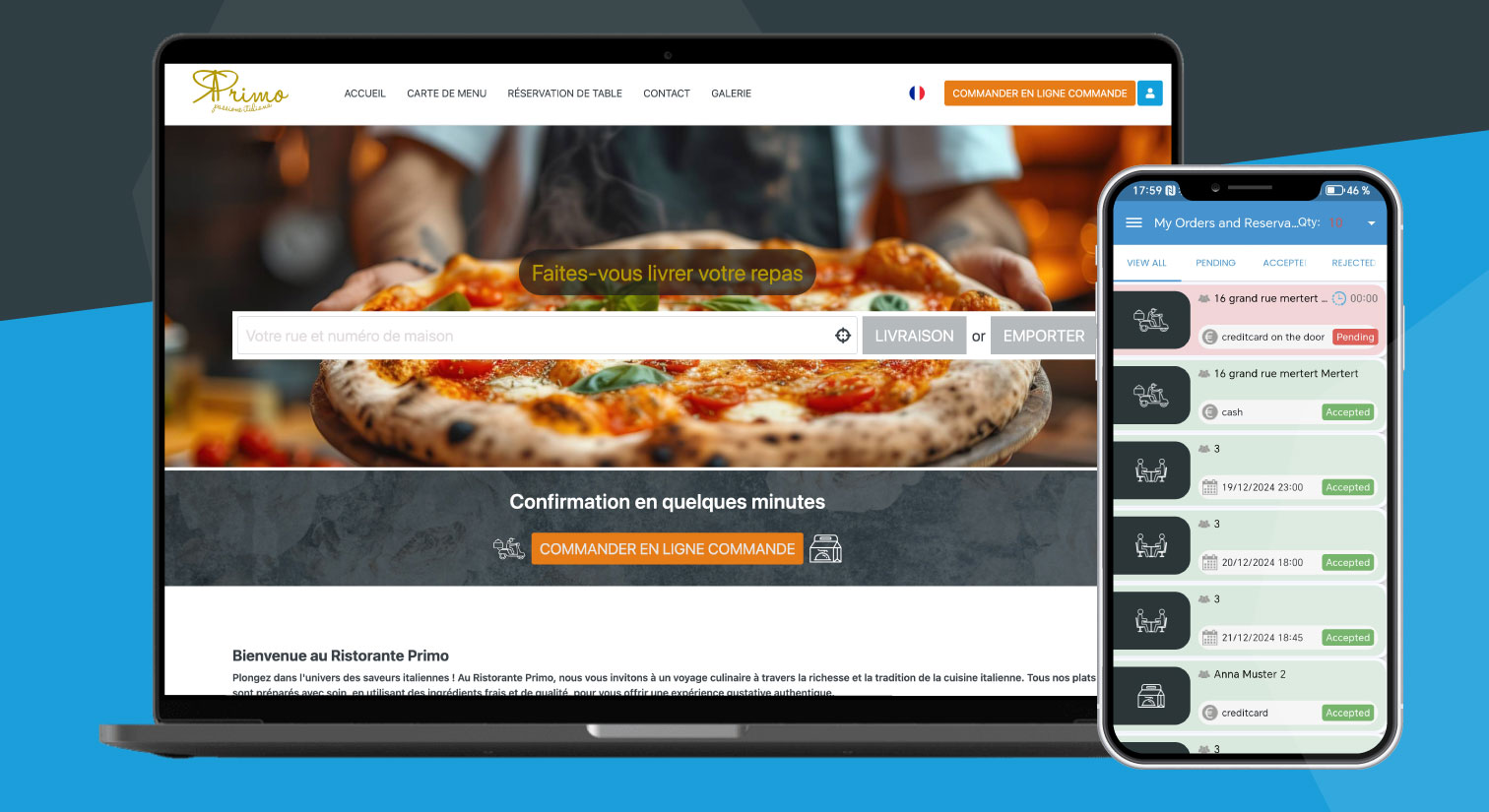
Using ristoranteprimo.eu as an example: your restaurant website is free and shows your own design with your colours, logo, images and texts. Guests order directly from you for delivery or pickup, or reserve a table.
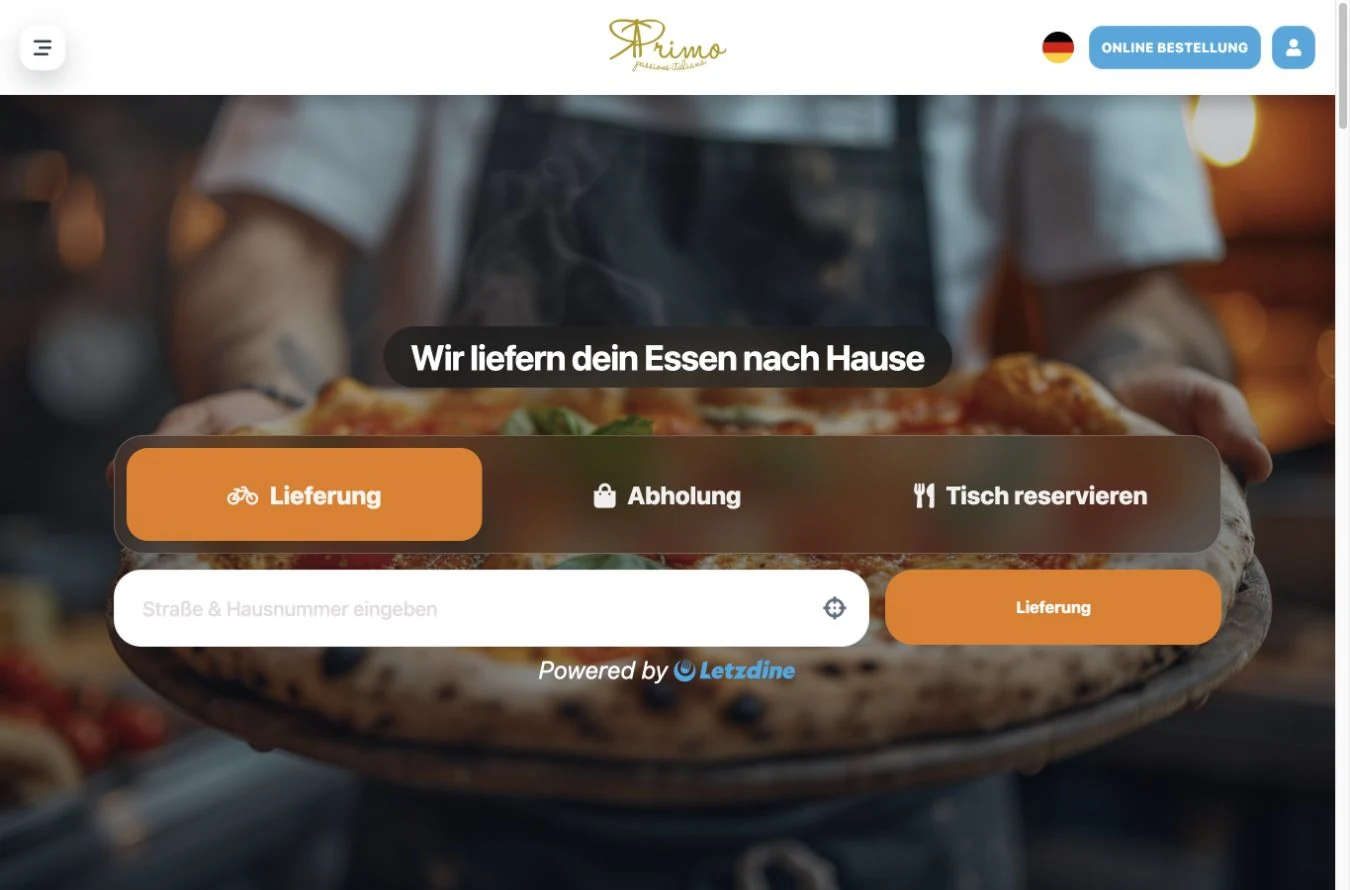
Your own website · example ristoranteprimo.eu
Your own restaurant website with your branding and the LetzDine ordering system connected. View the restaurant website.
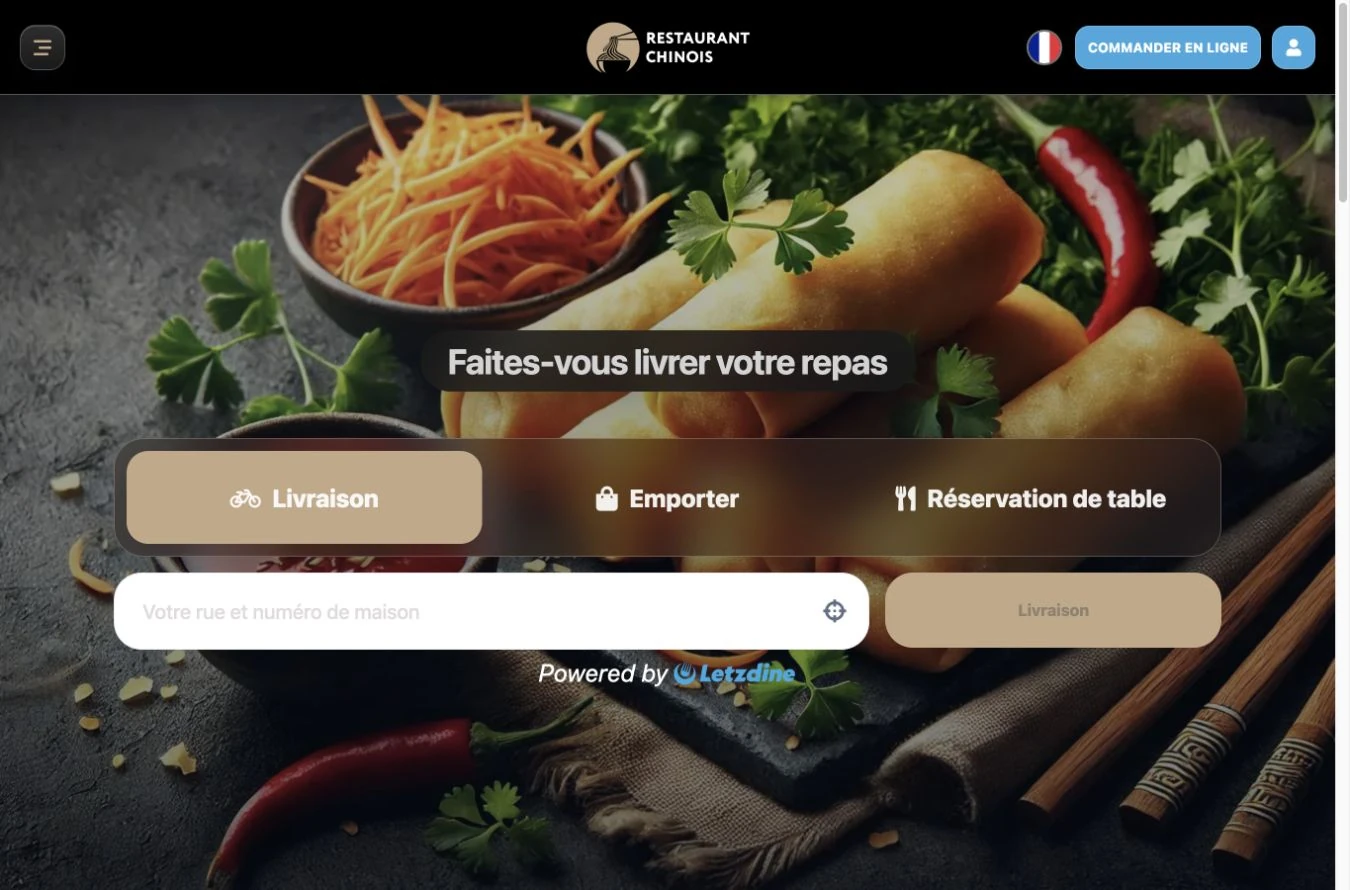
Second example: Restaurant Chinois
Same system, but its own colours, logo, images and texts. View the example website.
How guests choose extras and add a dish to the basket
Here you can see the process on Ristorante Primo's own website: choose a size, add extras and put the dish with your selection in the basket.
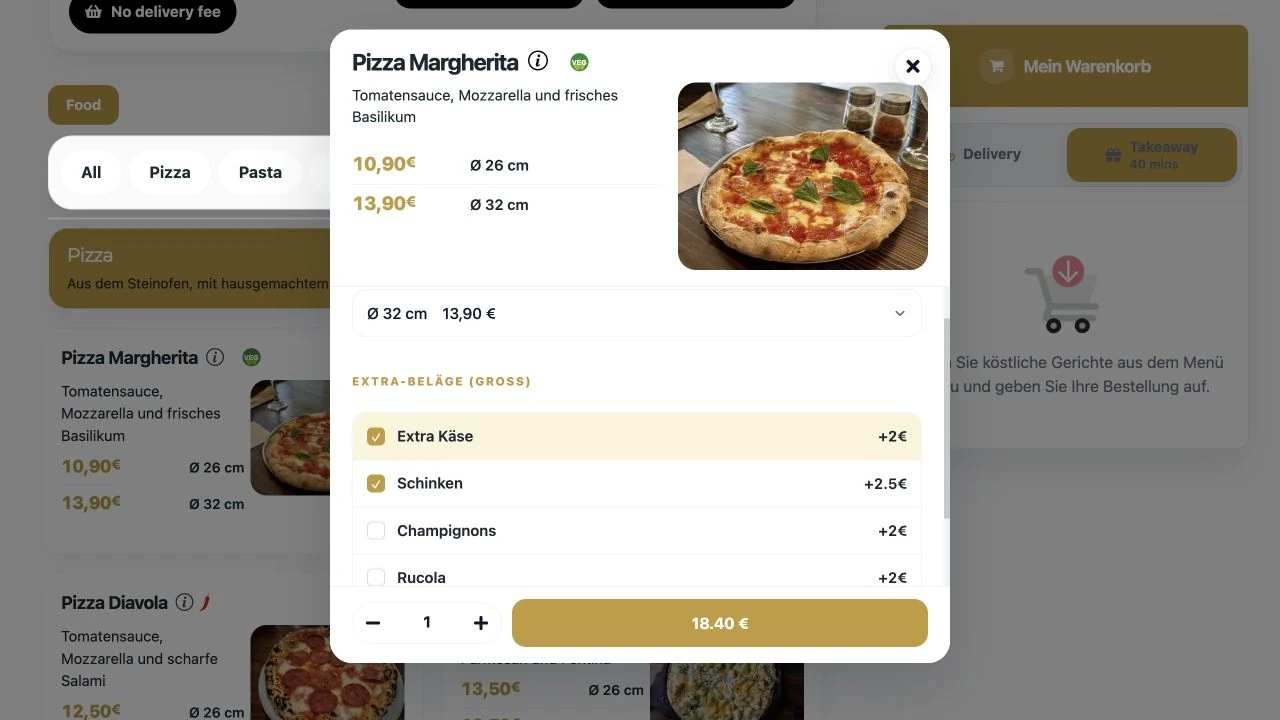
1. Choose size and extras
Guests choose the size and extras for a Ristorante Primo dish directly in the menu. In the example: Ø 32 cm, extra cheese and ham.
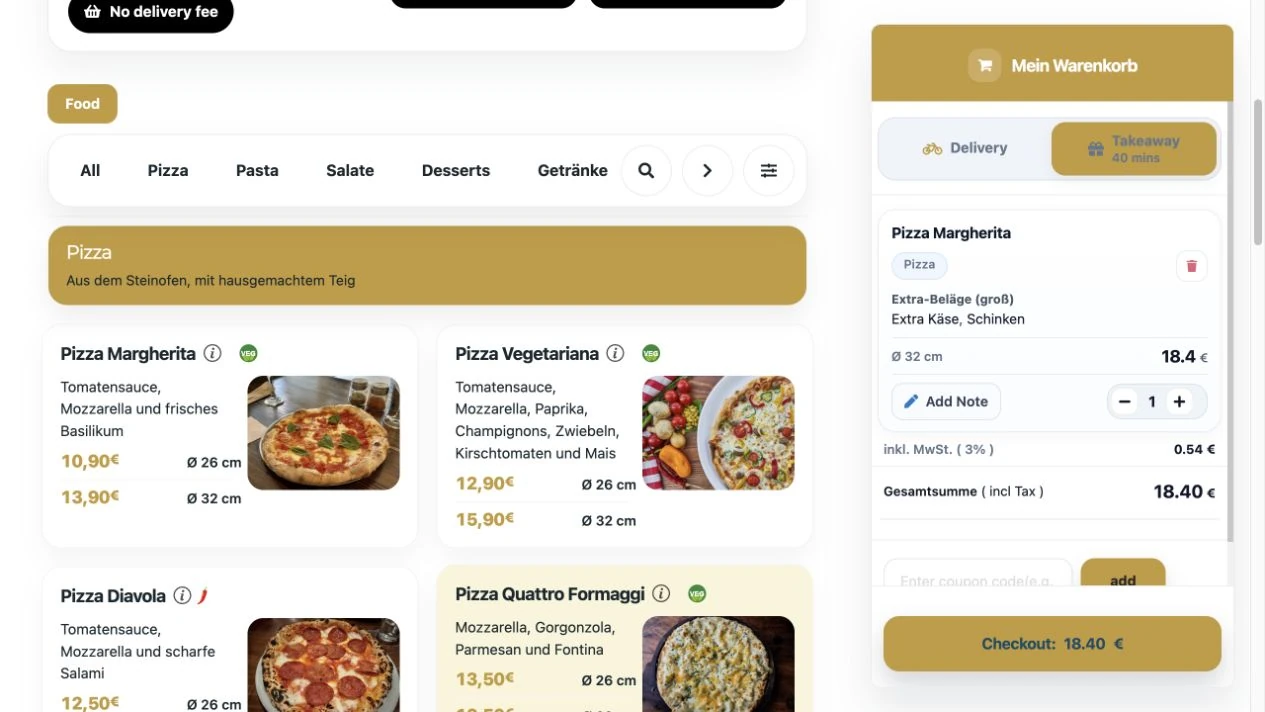
2. Dish with extras in the basket
The chosen dish sits in the basket with all extras and prices, clearly laid out before the order is completed.
Visible on the LetzDine platform
Your restaurant is also visible on the LetzDine platform. Guests see your menu there with photos, prices and extras, and discover restaurants by cuisine and location in the guest app.
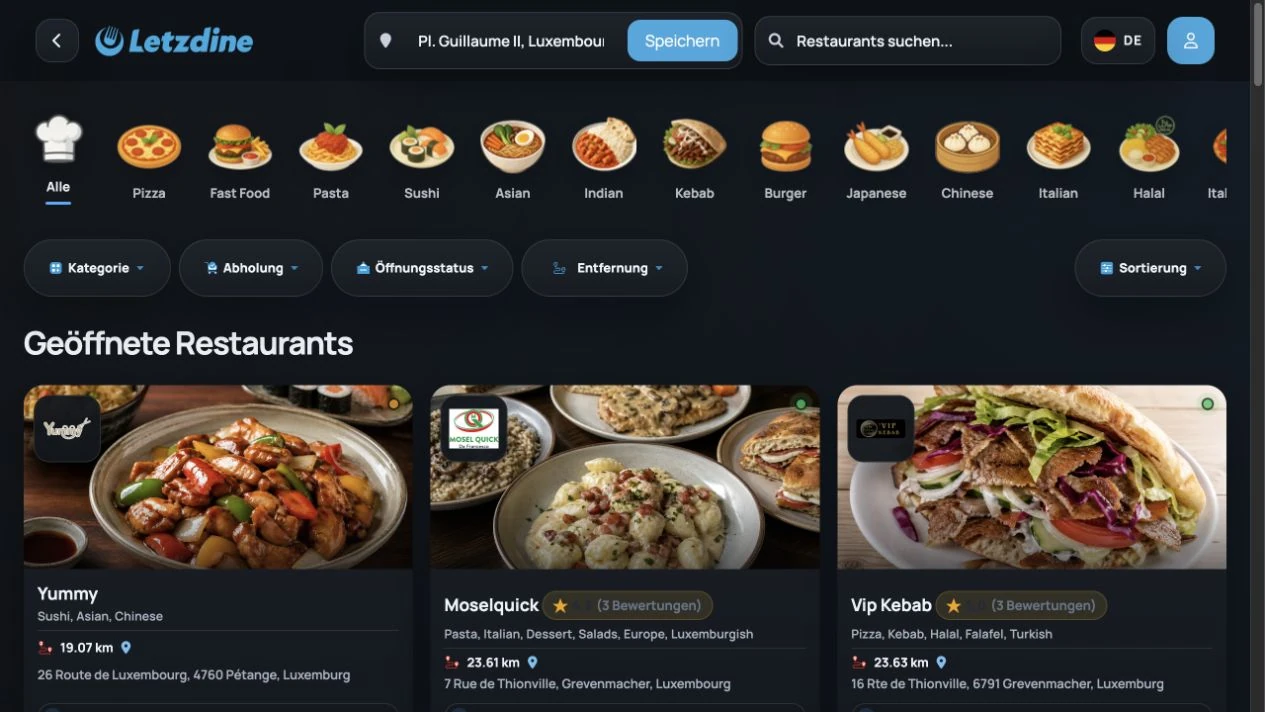
1. Search for restaurants on LetzDine
The shared LetzDine platform: guests search by location, cuisine and order type and choose from the restaurant overview.
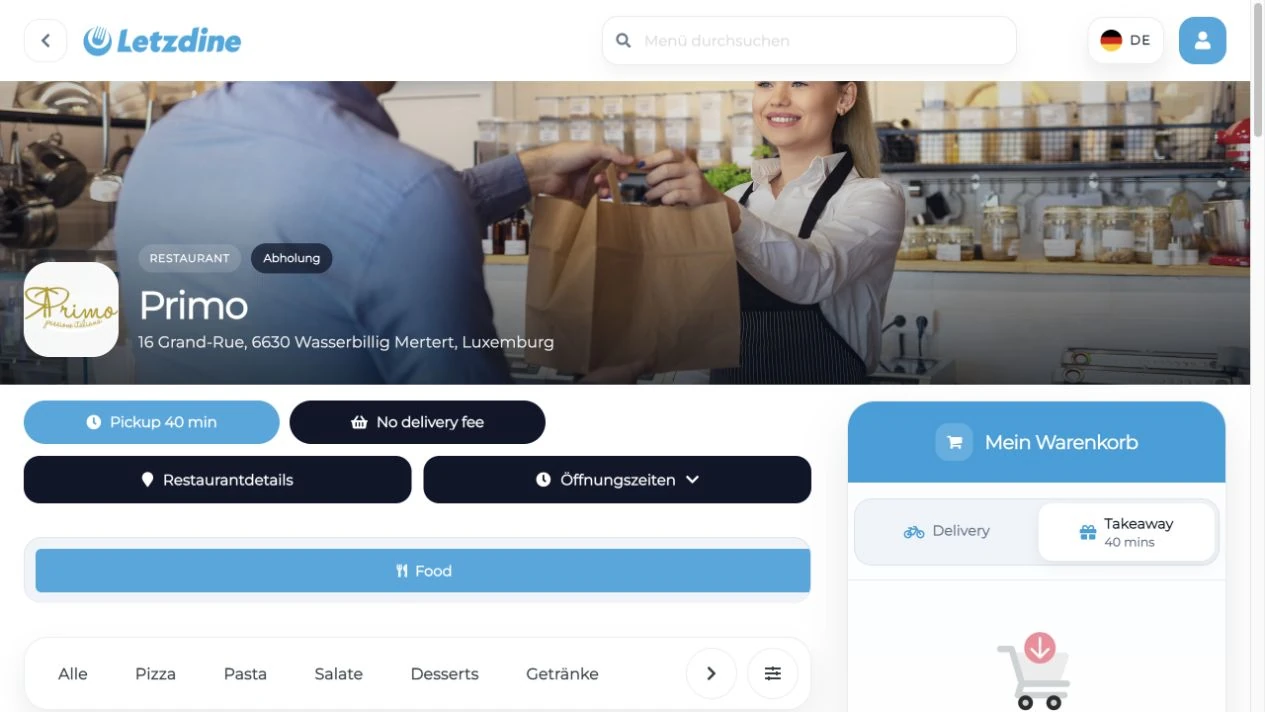
2. Open a restaurant in the LetzDine design
Once selected, the restaurant opens within the LetzDine platform – with the LetzDine logo, restaurant information and the connected menu.
View the menu within the platform
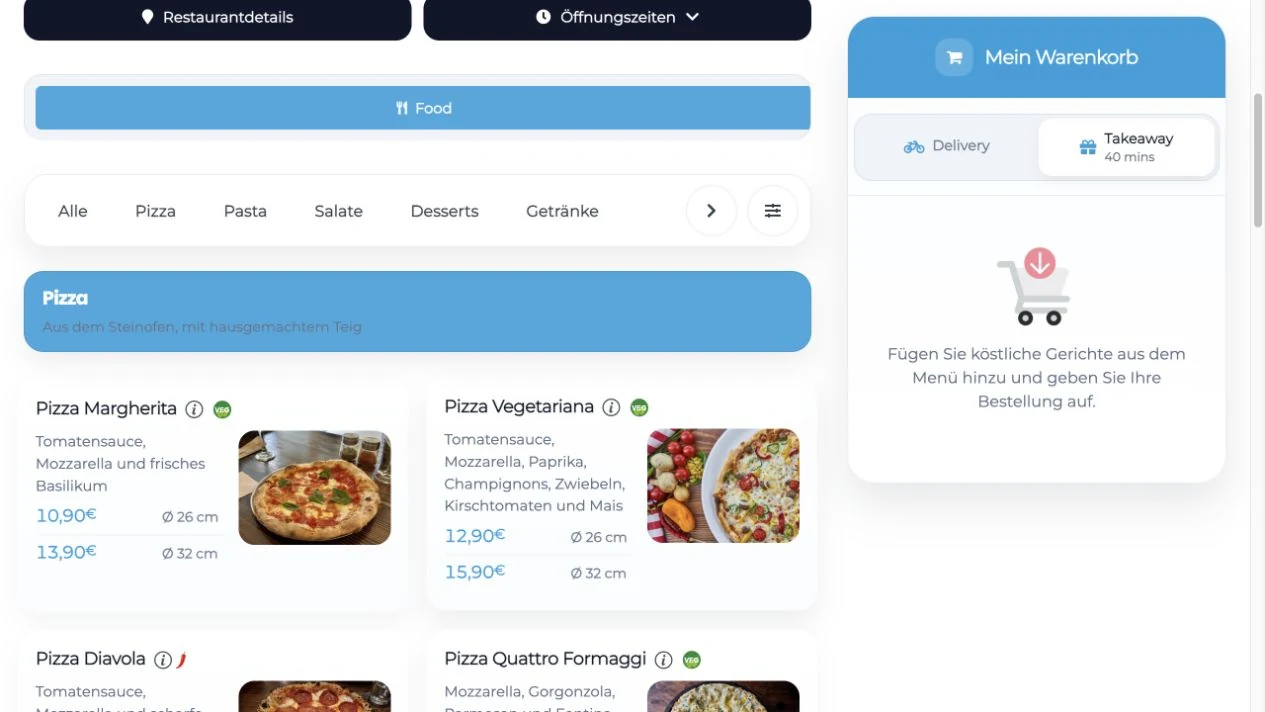
The menu on the LetzDine platform
Dishes, sizes, prices and extras are shown in the LetzDine design.
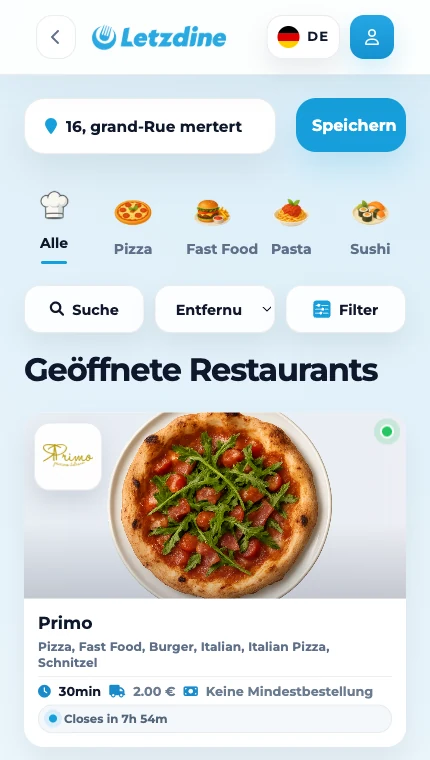
LetzDine is also available as a guest app
The restaurant overview with location search and cuisine filters is also available in the LetzDine app for guests.
Orders and menu under control
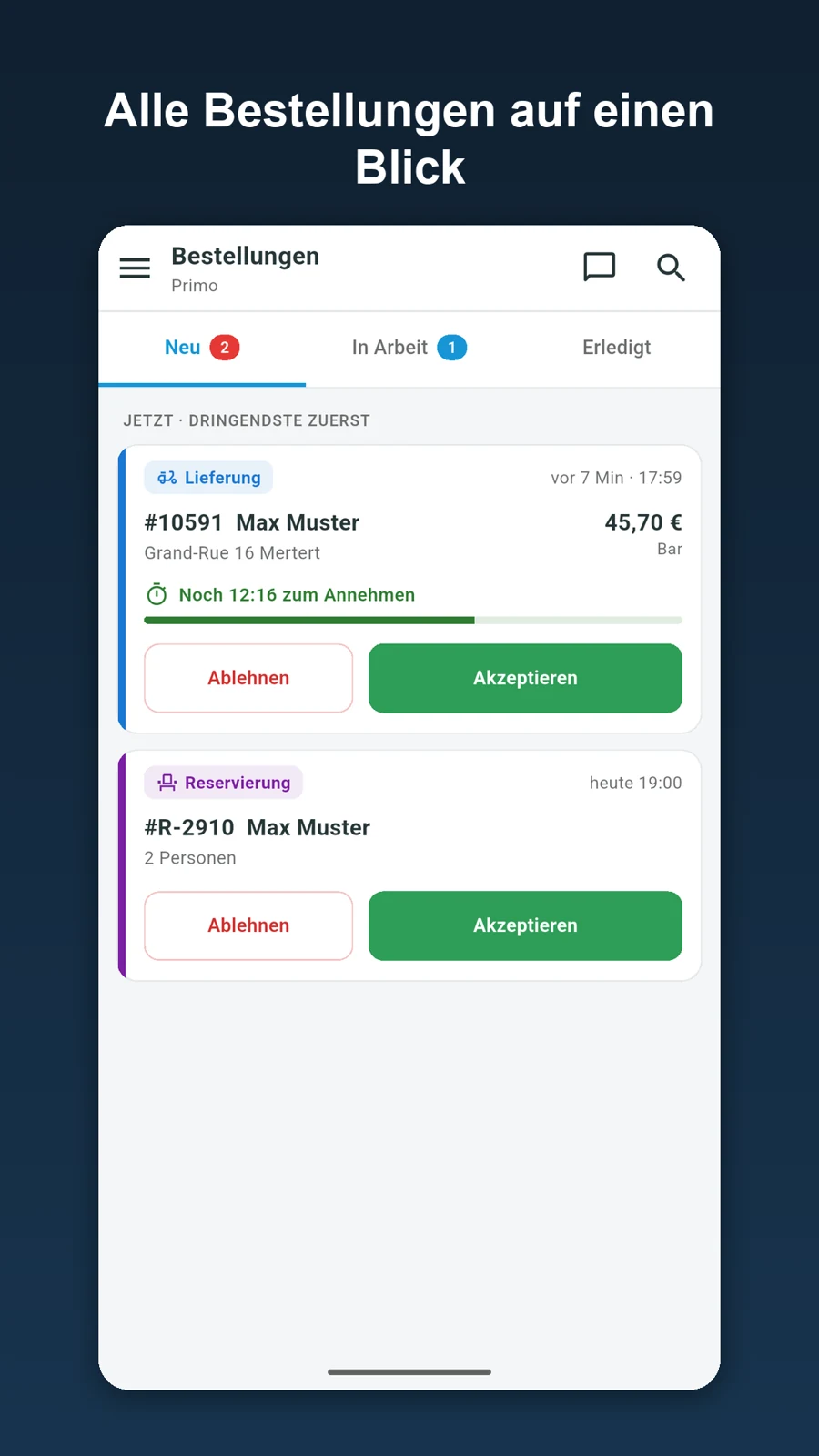
Your restaurant manager app
You accept or decline new orders directly and follow them from new to in progress to done. Reservations appear here too.
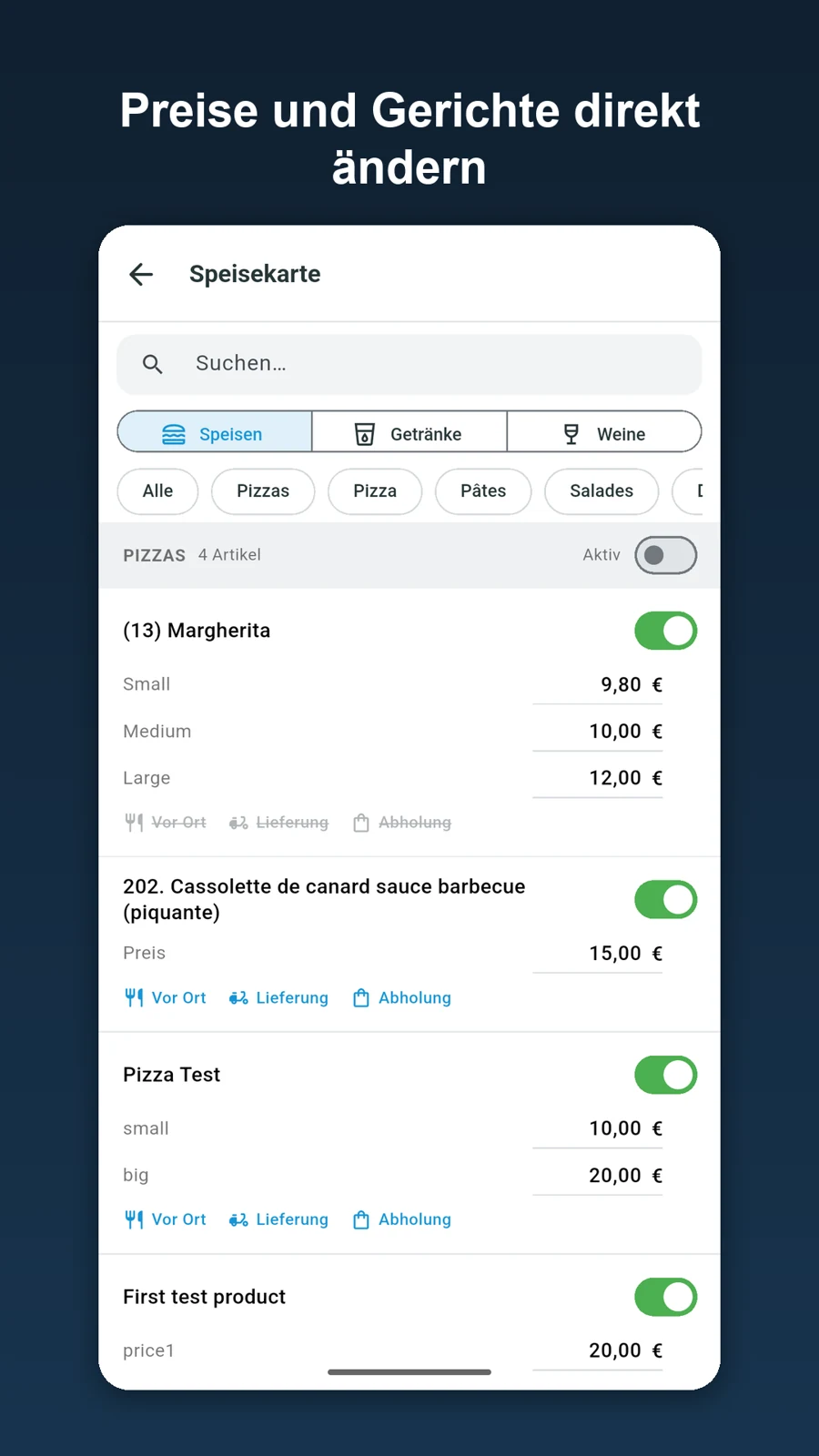
Your menu management
In the manager app you adjust dishes and prices and decide whether a dish is currently available.
App screens from our product material, partly with demo data (interface shown in German). Click an image to view it larger.
Switch to LetzDine for free: how we help you move
Switching to LetzDine is completely free for you – including the part that takes the most time: data entry. We enter your menu with categories, dishes, sizes, extras, descriptions and prices, take over your images and texts, and set up your restaurant website with your logo and colours. You don't have to type anything; just send us the documents you already have.
The process step by step
First we talk about order types, delivery areas, hours and receipt printers. Then we set everything up in the system. In the third step, you go through the content with us and check prices, descriptions and options; anything that isn't right, we correct. After that we test the ordering process with test orders, including receiving them in the app or on the printer. Only once you have approved everything do you switch your order links and QR codes over.
What it costs – and what it doesn't
After the switch, a simple model applies: up to and including 50 orders per month, you pay nothing. From the 51st order, you pay a flat 25 euros net for that month, with no commission per order. The count starts again the following month. Your payment provider's fees are added separately. The standard website in your colours, with your logo, photos and texts, is included; a tailor-made, custom-developed website is available separately on request.
Want to know whether LetzDine suits your restaurant? Take a look at the platform on LetzDine.eu or request your free switch directly from us. We'll get back to you personally and discuss how the move can work best for your business.
What you provide for the switch
To make the transfer quick, the following documents and details help us:
- Your current menu, for example as a link to your existing ordering page, as a PDF or as an export
- Photos of your dishes, if you want to keep using them
- Delivery areas with minimum order values and delivery costs
- Opening and service hours
- Details of your domain and your logo
- A Stripe account, if you want to offer online payment
Checklist before you switch over
Before the deadline, check every place through which guests reach your ordering page:
- The order button on your website
- The link in your Google Business Profile
- QR codes on flyers, table displays and packaging
- Links in your social media profiles
- A test order for delivery and pickup, including online payment
- Order handling via app or printer tried out under real conditions
Once every point is done, you can confidently send your guests to the new ordering page.
GloriaFood and LetzDine: costs compared
Up to and including 50 orders per month, you use LetzDine for free. From the 51st order, you pay a flat 25 euros net for that month, with no additional commission per order. The threshold resets every month. Your payment provider's fees are charged separately.
| Service | GloriaFood | LetzDine |
|---|---|---|
| Ordering system | US$0 per month Unlimited orders on the free plan | 0 € up to 50 orders per month Above that, a flat 25 € net for the month concerned |
| Order commission | No commission per order | No commission per order |
| Setup and data transfer | Self-setup on the free plan | Free switch including complete data entry |
| Online payment feature | Optional: US$29 per month Payment provider fees extra | Included in the LetzDine model described Payment provider fees extra |
Source: official GloriaFood price list, checked on 26 October 2026. GloriaFood quotes prices in US dollars, LetzDine in euros; amounts exclude taxes. No currency conversion is applied.
Further optional GloriaFood services according to the price list: advanced promo marketing for US$19 per month and the POS system for US$49 per month per location with a two-year commitment. These add-on products are not equivalent to a pure ordering system.
- 30 or 50 orders in a month: 0 € system fee.
- 51 or 200 orders in a month: 25 € net system fee for that month.
- Next month back to 50 orders or fewer: 0 € system fee again.
Your own restaurant website is included free of charge – with your colours, your logo, your images and your texts. For an additional, fully custom-developed website or extra hardware, we discuss the costs with you in advance.
Frequently asked questions about the GloriaFood alternative
When will GloriaFood be shut down?
According to the official website gloriafood.com, GloriaFood reaches the end of its life on 30 April 2027. By then your switch should be completed and tested.
Is LetzDine the official successor to GloriaFood?
No. LetzDine is an independent alternative. There is no partnership with GloriaFood or Oracle. We support your move as an independent provider.
Will you transfer my menu and my images?
Yes. We transfer categories, dishes, descriptions, prices and images based on the documents you provide and set everything up in LetzDine. You then review the content together with us.
What do I get with LetzDine?
You get a free restaurant website in your own design with your colours, logo, images and texts, a connected online ordering system and additional visibility on the LetzDine platform. You manage orders and the menu in the restaurant manager app. We handle the switch and data entry free of charge.
When should I start the switch?
As early as possible. That leaves enough time for the transfer, the joint review, test orders and updating order links, QR codes and your Google Business Profile.
What does switching to LetzDine cost?
The switch is free, including entering your menu, images and restaurant content. Up to and including 50 orders per month you pay nothing; from the 51st, a flat 25 euros net for that month, with no order commission. Payment provider fees are added separately.
Can I also get a fully custom restaurant website?
Yes. On request, we develop a website tailored entirely to your restaurant and connect it to the LetzDine system. We agree the scope and cost with you beforehand.
Who is behind LetzDine?
LetzDine is provided by VIRTUMA UG. We help you get set up and enter your menu, images and restaurant content as part of the free switch.
What is the difference between my restaurant website and the LetzDine platform?
Your restaurant website belongs to your business and shows your logo, colours, photos and texts; guests order directly from you there. The platform at LetzDine.eu is an additional place where guests search for restaurants near them and order. Both are managed in the restaurant app.
Can I use several receipt printers, for example for the kitchen and the bar?
Yes. In the restaurant app you add printers on your Wi-Fi network and set what each one prints – for example the kitchen ticket and customer receipt without drinks in the kitchen, and only the drinks at the bar. Accepted orders are then printed accordingly. We check together in advance whether your existing devices are suitable; any hardware costs are discussed with you beforehand.
What happens if I have more than 50 orders in a month?
From the 51st order you pay a flat 25 euros net for that month, with no commission per order. The count starts again the next month; if you then stay at 50 orders or fewer, you pay nothing again. Your payment provider's fees are added separately.
Can I change my menu myself after the switch?
Yes. You maintain prices, dishes, sizes and extras yourself in the restaurant app. Changes apply to your restaurant website and to the LetzDine platform.
Ready to switch from GloriaFood?
Send us your menu, images and restaurant content, and we'll set up LetzDine for you free of charge. You check everything before your guests start ordering.